
How to film
The setup takes 60 seconds and it is the biggest factor in how good your analysis is. Same guide as in the app, so you can send this page to a teammate.
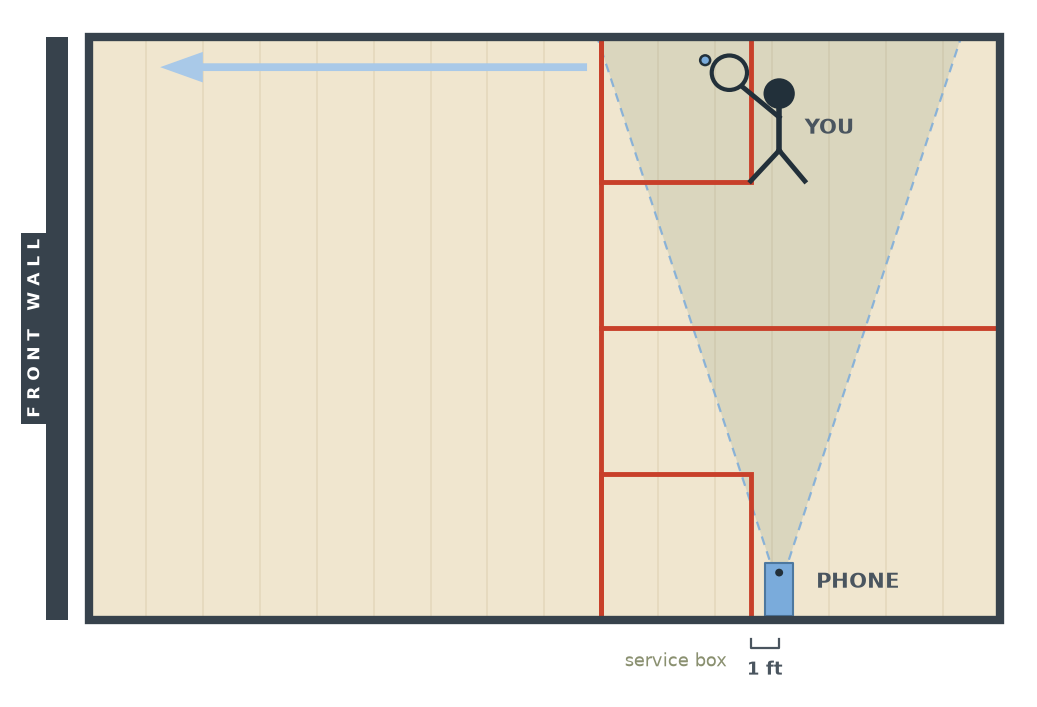
Lean your phone against the side wall
Lens facing across the court. No tripod needed, just make sure it is steady and will not slide.
Stand on the opposite side, side-on
Turn side-on toward the wall like a real drive stance and hit straight drives along it.
Keep everything in frame
Your whole body and your racket, through the full swing. Step back from the phone if the racket leaves the frame at the top.
Record 15 to 60 seconds
Solo hitting works best. Pick forehand or backhand drives in the app, then upload.
Small things that matter
Light
Court lights on. Dim footage hurts racket tracking most.
Steady
A moving phone ruins the analysis. Lean it, do not hold it.
One player
Solo hitting only. A second person in frame confuses tracking.
Normal video
Default camera settings are fine. The app handles frame rates.
Something look off in your report? Check support or email support@squashlab.app.